Tweet
Fully launched brandonsreason.com today! An elegant and nerdy website pertaining to #propellerhead products and using them in and out of the studio and filled with posts that have run-on sentences.
I hope to see you there!
Posts on this blog will soon be disappearing and containing links to new posts on the new site. And, the most exciting part is links to downloadables will no longer die out!
Even though the new site is fully launched that doesn't mean all the content from this site is fully transferred. Posts from this site are scheduled to be released at different points in the future, so if you subscribe, the posts won't fill up your feed.
note: I'm aware that certain files in posts are no longer downloadable. Some files will be restored, but no file is guaranteed to uploaded due my personal life schedule (who new I had a personal life?).
Friday, February 24, 2012
Wednesday, September 21, 2011
Thursday, July 28, 2011
My Favorite Keyboard is...(Part 2)
Tweet
Category 2) All I have is a control surface.
Let's rephrase this category and call it the "I have THE control surface," because let's face it, the control surface you have is going to be the home-front for all the wicked automation and programing you are going to be doing in your music. You might have a control surface that looks like the one in figure 1 or at least one that looks similar. In the end they all do the same thing. The chances are that if you only have a control surface, you are more interested in the DJ style side of music production/creation. Although, there is always the chance that you might want to record your own melodic line and make your own loops. So if money is tight (which it has been for all of us) don't be afraid to invest in a control surface before a keyboard. In fact, most DAWs have an onscreen keyboard built in that you can interact with using your own computer keyboard (figure 2, the one you type with). Don't worry, if those keys aren't enough for you then there are some cheap alternatives for our Category 3: Midi controller with control surface. Before we jump ahead though, let's gather our options here. We have the onscreen keys that allow us to play melodic lines (and more) and we have a physical control surface that allows us edit our recorded lines in real time and record the automation. Essentially we have a working studio and enough gear to pull off a live show!
Category 2) All I have is a control surface.
| Korg nanoKontrol2 (figure 1) |
![]() |
| Reason 5's Onscreen Piano Keys (figure 2) |
Let's rephrase this category and call it the "I have THE control surface," because let's face it, the control surface you have is going to be the home-front for all the wicked automation and programing you are going to be doing in your music. You might have a control surface that looks like the one in figure 1 or at least one that looks similar. In the end they all do the same thing. The chances are that if you only have a control surface, you are more interested in the DJ style side of music production/creation. Although, there is always the chance that you might want to record your own melodic line and make your own loops. So if money is tight (which it has been for all of us) don't be afraid to invest in a control surface before a keyboard. In fact, most DAWs have an onscreen keyboard built in that you can interact with using your own computer keyboard (figure 2, the one you type with). Don't worry, if those keys aren't enough for you then there are some cheap alternatives for our Category 3: Midi controller with control surface. Before we jump ahead though, let's gather our options here. We have the onscreen keys that allow us to play melodic lines (and more) and we have a physical control surface that allows us edit our recorded lines in real time and record the automation. Essentially we have a working studio and enough gear to pull off a live show!
Tuesday, July 26, 2011
Cyclone Lead Synth
Tweet
Check out this wicked cyclone lead synth:
Download the Combinator File Here:
http://www.fileswap.com/dl/60W8zn5m/ThePolitician.zip.html
Check out this wicked cyclone lead synth:
Download the Combinator File Here:
http://www.fileswap.com/dl/60W8zn5m/ThePolitician.zip.html
Sunday, July 10, 2011
My Favorite Keyboard is...(Part 1)
Tweet
Hey guys and gals, I'm kind of in the mood to just talk tonight. So, lets set aside our software and talk about our hardware. Every so often I will get an email or message on youtube asking about what keyboard I'm using or how they can better use their keyboard. Of course, if you send me a message I will personally talk to you about your setup up, but I've decided to set up a quick 3 category guide to how to better use your keyboard (when I say keyboard I mean the one you play and not the one you type with.
The 3 categories are as follows:
1) I only have keys {and maybe a slider/knob} 2) I only have knobs/sliders 3) I have keys and knobs/sliders
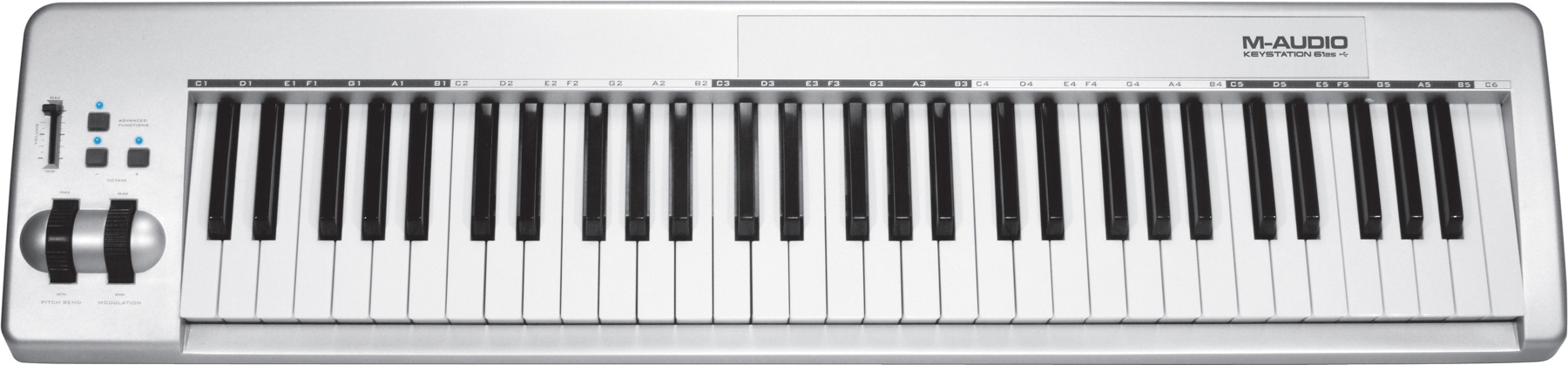
To be technical the first choice is just a MIDI keyboard. The second choice is just a control surface and the third choice is the mother of them all the MIDI Keyboard/control surface. Here is an example of each respectively
Hey guys and gals, I'm kind of in the mood to just talk tonight. So, lets set aside our software and talk about our hardware. Every so often I will get an email or message on youtube asking about what keyboard I'm using or how they can better use their keyboard. Of course, if you send me a message I will personally talk to you about your setup up, but I've decided to set up a quick 3 category guide to how to better use your keyboard (when I say keyboard I mean the one you play and not the one you type with.
The 3 categories are as follows:
1) I only have keys {and maybe a slider/knob} 2) I only have knobs/sliders 3) I have keys and knobs/sliders
To be technical the first choice is just a MIDI keyboard. The second choice is just a control surface and the third choice is the mother of them all the MIDI Keyboard/control surface. Here is an example of each respectively
| 1) M-audio 61 es |
| 2) Korg nanoKontrol2 |
| 3) M-audio Axiom Pro 61 |
Now lets consider what we have and how can implement its features.
Category 1:
Here you have a keyboard with little to no knobs/sliders that you can assign via MIDI. Even if you don't have knobs or sliders you still have keys and I am willing to bet you have a mod and pitchbend wheel. Just because those wheels are labeled mod and pitchbend doesn't mean that what you have to use them for. The mod wheel wasn't meant to be left alone and assigned to what ever your software defaults it to. You can use the mod wheel just like a slider. In fact, you can even use it to control the volume! Some keyboards have an expression wheels as well as the other two but in case you don't, don't fret (no guitar pun intended), you can assign the mod wheel to be your expression wheel.
If you are using Reason and Record then your best bet on getting the most out of the little bit of controls you have is to create a combinator. From here you can assign multiple functions from multiple devices to one control! If you don't know what I mean, check out this video.
Now that you have something assigned to to your wheels you still have all your keys. Unless your on a 25 keyboard then I think you will have some keys to spare. I don't know about you, but I'm more of a one hand on the keys and one hand on the controls kind of guy. So i'm really not going the full 61 (I prefer 61 key keyboards) keys. Since there is half of my keyboard not being used (depending on the song or how I'm working) why not assign the left overs to something in my software. The thing about keys are they only have two ways of affecting what you have them linked to and that is on and off. The only messages that register are 0 and 127. So you are better off assigning them to things such as the play/stop/loop functions.
Thursday, July 7, 2011
How to Set a Default Template
Tweet
Sometimes then we open Reason or Record we can find ourselves using the same devices. So, why not create a template that starts Reason/Record up with those devices ready to use?
Friday, June 10, 2011
I'm Back with the Software..and Vocal Doubling :)
Tweet
I am back to software tutorials and I am back with a REASON (and punnier). You guys have requested to see some vocal tricks and tips done in Reason/Record and I'm serving them up like dinner from Neptune (see what did there?). In fact, we kind of have a little series going on here, so what should we call it? How about.."The Vocal Series!" Yeah, I know I'm not being very creative here. If you have a better series name post a comment and let me know. Back to this weeks tutorial though. This week we are looking at vocal doubling or putting two lines together and making it sound like one. Don't know what I mean or want to know how? Watch this:
http://www.youtube.com/watch?v=H98p-hS8KuU
I am back to software tutorials and I am back with a REASON (and punnier). You guys have requested to see some vocal tricks and tips done in Reason/Record and I'm serving them up like dinner from Neptune (see what did there?). In fact, we kind of have a little series going on here, so what should we call it? How about.."The Vocal Series!" Yeah, I know I'm not being very creative here. If you have a better series name post a comment and let me know. Back to this weeks tutorial though. This week we are looking at vocal doubling or putting two lines together and making it sound like one. Don't know what I mean or want to know how? Watch this:
http://www.youtube.com/watch?v=H98p-hS8KuU
Tuesday, May 17, 2011
Reason's BV512 Vocoder Redefined
Tweet
Last week we used the Voice Synth feature from Record's Neptune Pitch adjuster. This week we are going old-school and using the BV512 Vocoder to...well...Vocode our vocals. As always I have uploaded the file to my fileshare so that you can download the file without worrying about getting the connections right. Watch the video below for more information on routing and how the vocoder works.
Record 1.5 File Download:
http://www.fileswap.com/dl/DzyDvcR/Vocoder_Redefined.html
Last week we used the Voice Synth feature from Record's Neptune Pitch adjuster. This week we are going old-school and using the BV512 Vocoder to...well...Vocode our vocals. As always I have uploaded the file to my fileshare so that you can download the file without worrying about getting the connections right. Watch the video below for more information on routing and how the vocoder works.
Record 1.5 File Download:
http://www.fileswap.com/dl/DzyDvcR/Vocoder_Redefined.html
Saturday, May 14, 2011
A Rare Glimpse
Tweet


I was able to take a rare glimpse inside of two world known organs at the Community of Christ World Headquarters church in Independence, Missouri. As a part of my music theory class, 2 other students along with my self visited the church to see and hear the organs. Of course I took a few pictures to report back to you so that you can see the inner workings of The Temple Organ. If you want more technical information you can visit the organs official page here http://www.cofchrist.org/dome_spire/organ.asp.

![]() |
| The Temple Organ |
Click on an image to enlarge |
| modern electrical workings added to the organ |

I was able to take a rare glimpse inside of two world known organs at the Community of Christ World Headquarters church in Independence, Missouri. As a part of my music theory class, 2 other students along with my self visited the church to see and hear the organs. Of course I took a few pictures to report back to you so that you can see the inner workings of The Temple Organ. If you want more technical information you can visit the organs official page here http://www.cofchrist.org/dome_spire/organ.asp.Tuesday, May 10, 2011
Neptune's Voice Synth Vocal Editing
Tweet
Need better vocals in Record? I know I sure do. Here's a sweet way to edit your vocals in Record 1.5 to play along with the sweet sounds you've created with Reason 5!
Download my Pre-loaded files:
http://www.fileswap.com/dl/nATQUiXC/Voice_Synth.html
Need better vocals in Record? I know I sure do. Here's a sweet way to edit your vocals in Record 1.5 to play along with the sweet sounds you've created with Reason 5!
Download my Pre-loaded files:
http://www.fileswap.com/dl/nATQUiXC/Voice_Synth.html
Tuesday, May 3, 2011
Reason 5 Spectrum Analyzer
Tweet
NOTICE:
This page will be available on and after February 28, 2012 at this link:
http://brandonsreason.com/post/18181351643/spectrumanalyzer
Sorry for the inconvenience.
sincerely,
Mr Brandon
NOTICE:
This page will be available on and after February 28, 2012 at this link:
http://brandonsreason.com/post/18181351643/spectrumanalyzer
Sorry for the inconvenience.
sincerely,
Mr Brandon
Wednesday, April 27, 2011
Free Subtractor Patch: "GAMEBOYvsZOMBIE"
Tweet
GAMEBOYvsZOMBIE by MrBrandonPeoples
Download here:
http://www.fileswap.com/dl/7cMx28Nw/GAMEBOYvsZOMBIE.html
I've decided to continue the "Zombie" theme and release another dead-esk patch. While reading the Reason 5 Operation Manual at school I was inspired to play with the Subtracter. Here it is, one of the few patches I have ever made with the Subtracter. I hope you enjoy it and don't forget to send me a link if you use it in a song. I'd love to hear what you come up with.
GAMEBOYvsZOMBIE by MrBrandonPeoples
Download here:
http://www.fileswap.com/dl/7cMx28Nw/GAMEBOYvsZOMBIE.html
I've decided to continue the "Zombie" theme and release another dead-esk patch. While reading the Reason 5 Operation Manual at school I was inspired to play with the Subtracter. Here it is, one of the few patches I have ever made with the Subtracter. I hope you enjoy it and don't forget to send me a link if you use it in a song. I'd love to hear what you come up with.
Saturday, April 23, 2011
Free "ZombieMom" Combinator Patch (Reason and Record)
Tweet
Happy Easter everyone! While on Easter break I've been slaving away working on new Reason and Record song ideas. Along the way I created a new patch that I have to share! I've also created a sample that you can listen to before you download it. Check it out and Keep Trackin'!
ZombieMomSample by MrBrandonPeoples
Download here:
http://www.fileswap.com/dl/XIoyDAFe/ZombieMom.html
Happy Easter everyone! While on Easter break I've been slaving away working on new Reason and Record song ideas. Along the way I created a new patch that I have to share! I've also created a sample that you can listen to before you download it. Check it out and Keep Trackin'!
ZombieMomSample by MrBrandonPeoples
Download here:
http://www.fileswap.com/dl/XIoyDAFe/ZombieMom.html
Tuesday, April 19, 2011
Combinator: Use For Live Performances
Tweet
NOTICE:
This page will be available on and after February 28, 2012 at this link:
Sorry for the inconvenience.
sincerely,
Mr Brandon
Monday, April 18, 2011
Great studio for less than a grand!
Tweet
I'm about to graduate from high school and have been looking to get my studio gear rolling. While I've been shopping I've gathered several links from different sites finding amazing deals on amazing gear. Best of all, I've managed to built the ultimate student studio for less than a grand. As a student I get some special discounts which I have included. I have listed both student and non-student deals with separate totals at the bottom.
note: Student items only are in purple. Prices may differ from country to country. Prices are subject to change.
Below are the sites I found the gear at. Each item is linked to it's corresponding page.
bhphotovideo.com
I'm about to graduate from high school and have been looking to get my studio gear rolling. While I've been shopping I've gathered several links from different sites finding amazing deals on amazing gear. Best of all, I've managed to built the ultimate student studio for less than a grand. As a student I get some special discounts which I have included. I have listed both student and non-student deals with separate totals at the bottom.
note: Student items only are in purple. Prices may differ from country to country. Prices are subject to change.
Below are the sites I found the gear at. Each item is linked to it's corresponding page.
bhphotovideo.com
Avid Mbox 3 w/Pro Tools LE 8 ($263.54)
(2)
Mackie MR8 150W 8" Active Two-Way Studio Monitor ($419.98)- Auralex MoPAD - Monitor Isolation Pads - 1 Set (Four Pieces) ($38.99)
Sweetwater.com
Musiciansfriend.com
Totals:
Student = $907.41
Normal = $1032.41
If you aren't a student and the extra $124.00 is the roadblock between your gear and your significant other allowing you to buy then you still have a few options. You can decrease the length of the audio cable or find a cheaper pair of cables. You can also get the Mackie MR5 studio monitors (although not suggested). You will loose 3" compared to the MR8's which as we all now, those extra 3" will give a better frequency response. Another choice you have is to stick with Pro Tools LE 8. What you will miss out on increased available track lanes, and compatibility with interfaces rather than the M Box. (thanks to RAYGProductions for the Pro Tools tips).
The point of this is to help you find quality gear with out burning a whole in your life savings. While it is possible to get a cheaper setup, you will get just that. A CHEAP set-up. As a student this is all can afford and is a major improvment in my current set-up. So, go and enjoy these great deals and let me know if you find anything better in a comment or from the "Contact" page.
- Pro Tools 9 Crossgrade: LE to 9 Student Discount ($125.00)
- Pro Tools 9 Crossgrade: LE to 9 ($249.00)
Musiciansfriend.com
Totals:
Student = $907.41
Normal = $1032.41
If you aren't a student and the extra $124.00 is the roadblock between your gear and your significant other allowing you to buy then you still have a few options. You can decrease the length of the audio cable or find a cheaper pair of cables. You can also get the Mackie MR5 studio monitors (although not suggested). You will loose 3" compared to the MR8's which as we all now, those extra 3" will give a better frequency response. Another choice you have is to stick with Pro Tools LE 8. What you will miss out on increased available track lanes, and compatibility with interfaces rather than the M Box. (thanks to RAYGProductions for the Pro Tools tips).
The point of this is to help you find quality gear with out burning a whole in your life savings. While it is possible to get a cheaper setup, you will get just that. A CHEAP set-up. As a student this is all can afford and is a major improvment in my current set-up. So, go and enjoy these great deals and let me know if you find anything better in a comment or from the "Contact" page.
If you are viewing this from another site or feed. Please contribute by viewing the original post here.
Tuesday, April 12, 2011
Combinator Assigning Knobs and Buttons
Tweet
NOTICE:
This page will become available on March 13, 2012 at this link:
http://brandonsreason.com/post/18201043294/combinatorassgknobbut
Sorry for the inconvenience.
sincerely,
Mr Brandon
Sunday, April 10, 2011
Reason 5/Record 1.5 Feature Suggestion
Tweet
Not to long ago I was browsing through the Phead (Propellerhead Forum) and discovered a post in the feature suggestion section about adding notes to tracks in a song. While R&R already have a spot to add names to track in the sequencer it's not really a note pad. I've designed an image that shows what this feature could look like if it was implicated.
note: the "note" feature is not yet implicated, this features is simulated in the image.
Not to long ago I was browsing through the Phead (Propellerhead Forum) and discovered a post in the feature suggestion section about adding notes to tracks in a song. While R&R already have a spot to add names to track in the sequencer it's not really a note pad. I've designed an image that shows what this feature could look like if it was implicated.
note: the "note" feature is not yet implicated, this features is simulated in the image.
Tuesday, April 5, 2011
Combinator: Keyboard Split
Tweet
NOTICE:
This page will become available on and March 20, 2012 at this link:
Sorry for the inconvenience.
sincerely,
Mr Brandon
Monday, April 4, 2011
Week of Mayhem
Tweet
Instead of bombarding you with a giant post of photos, I have decide to post my photos for the week in a facebook album. Even if you don't have Facebook these photos will be available to you with the provided link. Underneath each photo is a short description for what is going on in the photo. Enjoy and leave some comments. My band and myself enjoy talking to you guys.
http://www.facebook.com/album.php?aid=350032&id=768767703&l=3a25ae3a31
Heres a description of what is going on as a whole in the album.
This week my band (Break the Fall) was back in the studio finishing up our EP. Not only did we finish most of the Ep but on Saturday we treaded a few hours away from home to play at the Relay For Christ 2011 in Sedalia, Missouri. We were able to play with some new sound equipment that made for an amazing concert. Of course getting to meet some new people in a new area we hadn't played before was great too. BTF's fan-base is amazing for it's size and getting to talk with them is the greatest feeling ever. After the show we had a live interview for 93.7 The Fountains Saturday night rock show "The Stand." The experience at the radio station was phenomenal! Not only did we get to talk with Kansas City and the host KC but we played a live acoustic set too. All in all we had a busy week, but nonetheless we had a great week. I can't wait to see what else God has in store for us!
Instead of bombarding you with a giant post of photos, I have decide to post my photos for the week in a facebook album. Even if you don't have Facebook these photos will be available to you with the provided link. Underneath each photo is a short description for what is going on in the photo. Enjoy and leave some comments. My band and myself enjoy talking to you guys.
http://www.facebook.com/album.php?aid=350032&id=768767703&l=3a25ae3a31
Heres a description of what is going on as a whole in the album.
This week my band (Break the Fall) was back in the studio finishing up our EP. Not only did we finish most of the Ep but on Saturday we treaded a few hours away from home to play at the Relay For Christ 2011 in Sedalia, Missouri. We were able to play with some new sound equipment that made for an amazing concert. Of course getting to meet some new people in a new area we hadn't played before was great too. BTF's fan-base is amazing for it's size and getting to talk with them is the greatest feeling ever. After the show we had a live interview for 93.7 The Fountains Saturday night rock show "The Stand." The experience at the radio station was phenomenal! Not only did we get to talk with Kansas City and the host KC but we played a live acoustic set too. All in all we had a busy week, but nonetheless we had a great week. I can't wait to see what else God has in store for us!
Saturday, April 2, 2011
Glimpse of the Future
Tweet
Notice anything new about this post? I've added a tweet widget for easier sharing in case you want to share a post with a friend or with anyone else! I know you guys want more posts full of rich content and I have something in store for you. I've been very busy this and it is about time to sit down and talk about the sweet music-y stuff. So, look forward to that and I will leave you with a sneak peak of the post to come!
Subscribe to:
Posts (Atom)